
Laptop Behind the GM Screen: How to Use It During a Session Without Letting It Get in the Way
The Talehaven team9 min read
A laptop behind the GM screen can be one of the most useful tools at the table.
It can also become the place where the session disappears for thirty seconds every time you need to find something.
The difference is rarely the computer itself.
It is usually what you have open and how quickly you can move between the things you actually need.
During play, your attention belongs at the table.
The laptop should help you get back there faster.
Preparation and running the game are two different modes
Before a session, you have time.
You can write, reorganise folders, edit an NPC, search for an image, compare maps and adjust a soundtrack.
During the session, that workflow stops working.
A player asks:
What was the priest's name?
You do not have three minutes.
You have a few seconds before the conversation loses momentum.
That means the things you prepare beautifully are not always the things you run easily.
Before the game begins, switch from **preparation mode** to **play mode**.
Close the things you will not need.
Open the things you probably will.
Give yourself one starting place
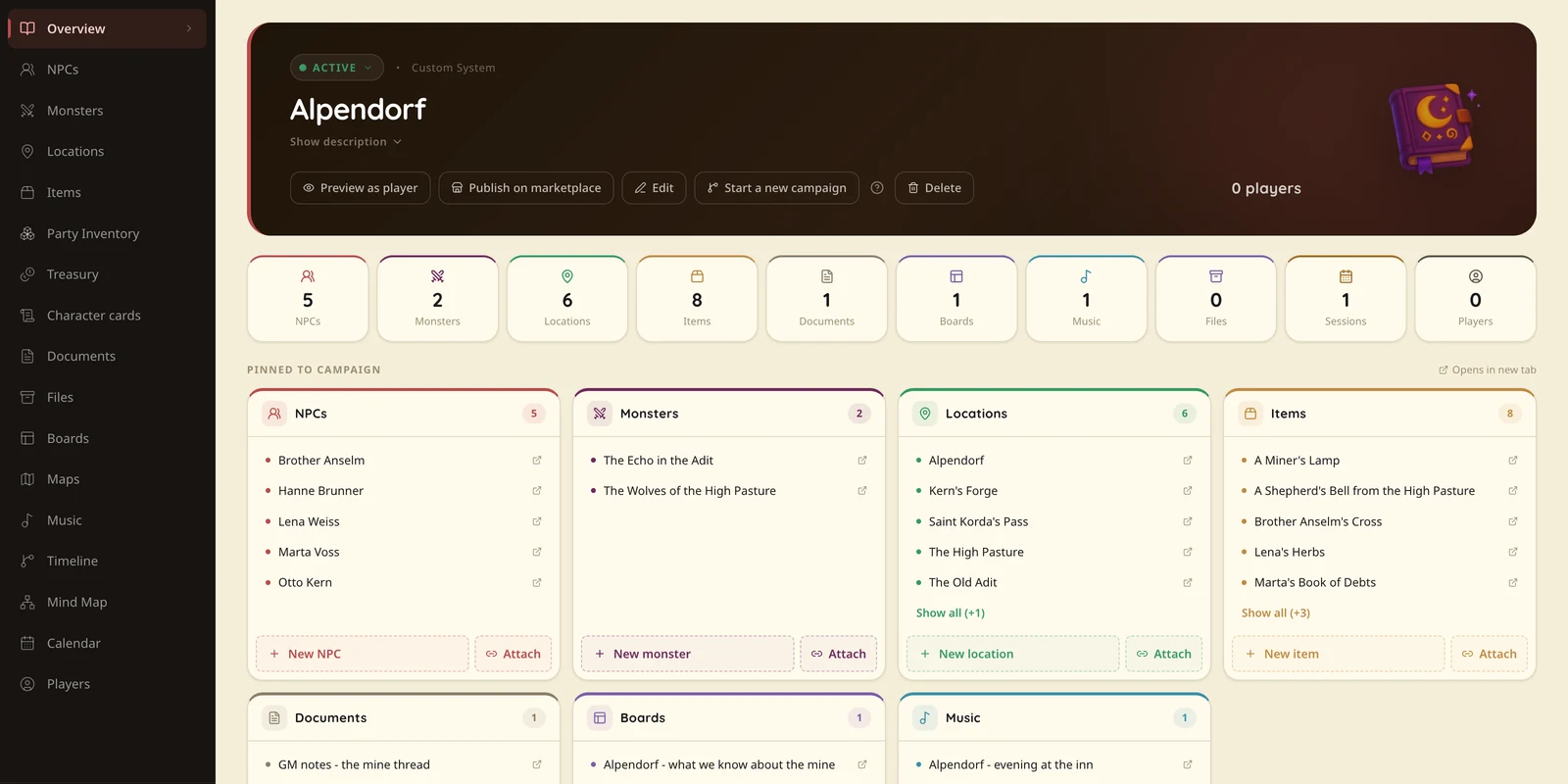
The easiest improvement is having one place you can always return to.
Not ten browser tabs.
Not a folder hierarchy you need to remember.
One campaign view, one session document or one dashboard that acts as home base.
From there, you should be able to reach the current scenario, the NPCs likely to appear, important locations, the map and the notes from the previous session.
If you use Talehaven, the campaign itself can be that starting point. If you use Notion, OneNote or folders, build the same idea there.
The tool matters less than the habit.
You should always know where "home" is.
Keep the current session in front of you
Your session document should not contain the entire campaign.
It needs the things relevant tonight.
The current problem.
The opening situation.
A few scenes or events that may happen.
Names you are likely to forget.
Important clues.
Consequences already in motion.
Links or references to the NPCs and locations you may need.
The goal is not to scroll through a wall of text while the players wait.
The goal is to glance, remember and keep talking.
NPC cards should answer the question you actually have during play
When the party meets an NPC, the GM usually needs a very small set of information.
Who is this person?
What do they want?
How do they act?
What do they know?
What are they hiding?
Maybe a few stats if the system requires them.
That is enough for the first layer.
If the NPC becomes important, you can open the full details.
This is especially useful in a campaign where the players regularly return to people from five, ten or twenty sessions ago.
You do not want to reread a biography.
You want your memory restored in ten seconds.
Locations work the same way
A location used during a session should help you run scenes.
Not prove that you prepared thoroughly.
A tavern page is more useful when it tells you:
- who is here,
- what immediately stands out,
- what can be discovered,
- what is hidden,
- what is connected to this place,
than when it gives you three paragraphs about architectural history.
During play, practical detail beats complete detail.
Use a board when the campaign has too many moving parts
There is a point where a list stops being enough.
Three NPCs and one faction fit comfortably in your head.
Twelve NPCs, four factions, two betrayals and an item that changed hands three times may not.
A board or relationship map can help because it shows connections spatially.
You can see who works for whom, who owes money, which NPC is linked to which location and where the current conflict actually sits.
This is one of the moments where a laptop can be much better than paper.
Not because digital is automatically superior, but because the campaign can be viewed from several angles without rewriting the same information.
Maps should be ready before anyone asks for them
A map loses half its usefulness if the GM spends two minutes searching for the file.
If you know the party may visit three places tonight, have those maps ready.
The same applies to handouts, portraits and other visual material.
Do not make the session wait for your operating system.
If you use interactive maps, keep the current one easy to reach and move deeper only when the players actually enter another area.
Music needs fewer controls, not more
Music is a classic laptop trap.
You start with a simple idea: background music.
Then you have YouTube, Spotify, six playlists, three browser tabs, volume controls and an advertisement trying to sell you a mattress during the funeral of a beloved NPC.
The simplest setup usually works best.
Prepare a few broad moods instead of a track for every possible scene.
For example:
- calm exploration,
- tension,
- combat,
- melancholy,
- something strange.
During play, changing the mood should take seconds.
If music management requires more attention than the conversation, it is no longer helping.
Make quick notes without stopping the scene
During a session, you will invent things.
Names.
A shop.
A relative.
A promise.
A strange object.
A decision that will matter later.
You do not need to fully organise each one immediately.
Capture it.
That is enough.
Roderick owes Marta 20 silver.
The blacksmith's daughter is called Lena.
Players promised to return the ring.
After the session, turn those scraps into proper campaign information if they still matter.
Trying to perfectly categorise everything while playing is a very efficient way to stop listening to your own players.
The laptop should reduce switching
The biggest advantage of a digital setup is not that it can contain more information.
A folder can also contain thousands of files.
The advantage is being able to move from the thing currently happening to the thing connected to it.
The party is in a location.
From there you open the NPC living there.
From the NPC you see the item they are hiding.
The item connects to the faction behind the current problem.
That kind of context is why we keep developing Talehaven around connected campaign elements rather than treating everything as separate documents.
But the principle works everywhere.
Organise information around how you use it, not only around what type of file it is.
Keep the screen out of the conversation
There is also a social part to this.
A laptop creates a physical barrier.
It is easy to look at the screen while players are talking, especially when you are checking rules or preparing the next thing.
Try not to disappear behind it.
Look at the table.
Close it slightly when you do not need it.
Use keyboard shortcuts and prepared views so your eyes spend less time searching.
Technology should support the conversation, not become another person sitting between you and the group.
What I would keep open
For a normal session, my setup can be surprisingly small:
- current session document,
- current campaign view,
- relevant NPCs and locations,
- one map,
- music,
- a place for quick notes.
Everything else stays available, but not in front of me.
You do not need your entire archive open.
You need a short path to the archive.
A good laptop setup disappears
That is the best test.
If you spend the whole session thinking about the tool, the setup is too complicated.
If somebody asks about an NPC from six sessions ago and ten seconds later you are back in character, it is doing its job.
If the players change direction and you can reach the new location, its people and the relevant map without killing the pace, it is doing its job.
A laptop behind the GM screen should not make the session more digital.
It should make the boring parts of running it take less time.
Then you can get back to the part that actually matters.
The people on the other side of the screen.
If what we are building is useful to you, you can buy us a coffee.
Support on Ko-fiKeep one campaign in one place
Documents, NPCs, locations, maps and music next to each other - so the session does not start with a search.
Try Talehaven