
A new D&D campaign usually starts out manageable. You have a setting, a few characters, some notes about the first adventure, and perhaps a map you've been meaning to print. Three months later, the party has adopted an NPC you invented on the spot, angered two rival factions, and acquired an assortment of magical objects whose properties you're not entirely sure you remember correctly.
Somewhere in your notes is the name of the merchant who sold them that suspicious amulet. Unfortunately, finding it now would require searching through six documents, a Discord conversation, and a notebook you haven't opened since August.
This is usually when Dungeon Masters start looking for a campaign management tool. The difficulty isn't finding one. It's figuring out which kind of tool you actually need, because applications described as D&D campaign managers can do very different things.
Some are excellent for building detailed fictional worlds. Others focus on organizing notes, sharing information, or running tactical encounters online. And while many offer free plans, those plans don't always include the same features.
We've put together seven options worth exploring in 2026. For transparency, Talehaven is one of them, and we're the team building it. We'll explain where it fits, along with the situations where another application may be the better choice.
Seven D&D campaign management tools worth trying
| Tool | Best suited for | Free access |
|---|---|---|
| Talehaven | Adventure preparation and campaign organization | Free plan |
| Notion | Custom campaign databases and dashboards | Free plan |
| Obsidian | Connected notes and campaign lore | Free personal use |
| Kanka | Structured worldbuilding and campaign records | Free core features |
| World Anvil | Detailed fictional worlds and histories | Limited free plan |
| Roll20 | Playing D&D online | Free plan |
| LegendKeeper | Visual worldbuilding and campaign wikis | Free trial for creation |
The right choice depends less on the number of features and more on the problems you're trying to solve. Someone running a weekly online combat-heavy game will have different priorities from a GM who plays at a kitchen table and mostly needs to keep track of people, places, and unfinished storylines.
Talehaven: For preparing and running adventures
Let's say you're preparing an adventure involving a missing merchant, a suspicious innkeeper, and an abandoned mine. You'll probably need a handful of NPCs, several locations, some clues, and perhaps a map for the final encounter.
You could organize all of that in a collection of documents, and plenty of GMs do exactly that. Talehaven approaches it by giving those elements their own place within a campaign, while allowing you to bring the relevant materials together when preparing individual adventures.
You can create NPCs, monsters, locations, items, maps, documents, and character sheets. The Adventure module lets you arrange scenes and keep the material needed for each encounter nearby, while Boards provide a visual workspace for connecting characters, clues, and other campaign elements.
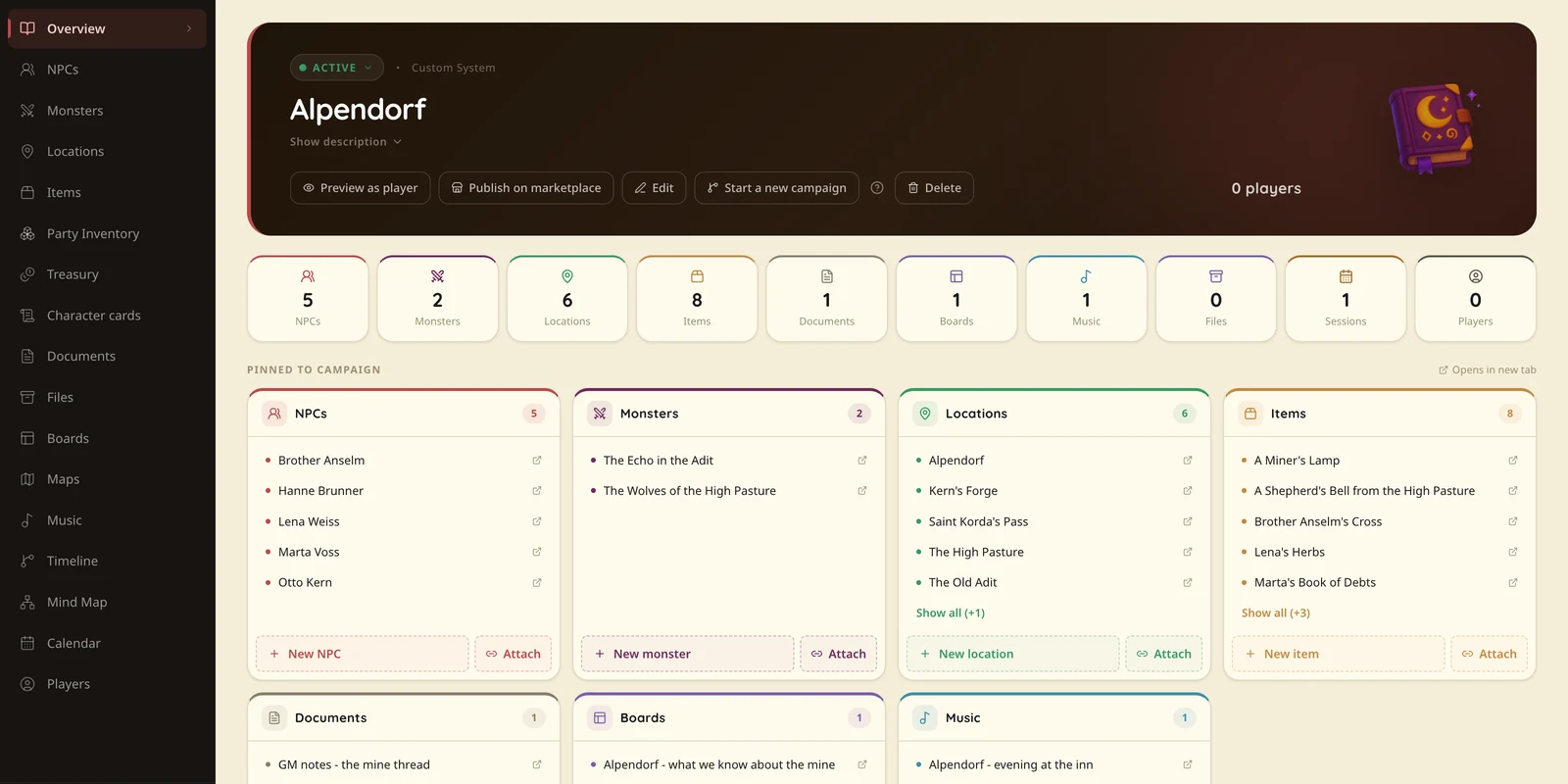
There's also a distinction between what the GM knows and what the players are allowed to see. You can prepare information in advance and share selected material when the party discovers it, without maintaining a completely separate set of player notes.
That becomes useful during actual play. If the party decides to question the innkeeper instead of investigating the mine, you can bring up the character's information and continue from there. You still have to improvise the conversation, of course, but you don't have to spend several minutes finding the notes that explain what the innkeeper knows.
Talehaven works with different tabletop RPG systems, so you're not restricted to D&D. Its core tools are free, while optional paid plans provide additional storage for uploaded files.
Where it fits best: GMs who want their adventure preparation, maps, NPCs, notes, and player materials organized around the campaign they're running.
What to consider: Talehaven isn't intended to replace every advanced combat automation feature offered by dedicated virtual tabletops.
Notion: For building your own campaign workspace
Notion wasn't created for tabletop RPGs, but its flexibility makes it an appealing option for Dungeon Masters who enjoy organizing information.
You can create databases for characters, locations, quests, and magic items, then arrange them into dashboards suited to your campaign. Perhaps your main page shows the next session date, the party's current objectives, and a list of unresolved storylines. Another page might contain the political factions in your setting, with links to individual NPCs and locations.
The advantage is that you decide how everything works. The disadvantage is that you also have to build and maintain that structure.
For some people, designing the perfect campaign database is genuinely enjoyable. Others would rather spend that evening preparing the adventure itself.
Notion has a free plan for personal use, although some collaboration and workspace features have limitations.
Where it fits best: GMs who want maximum control over their organizational system, particularly those already familiar with Notion.
Obsidian: For campaigns with a lot of connected information
Obsidian becomes particularly interesting when your campaign has accumulated a large amount of lore. Maybe you've spent several years developing a homebrew setting, or your players have spent forty sessions uncovering a political conspiracy involving characters who appeared much earlier in the campaign.
Obsidian allows you to connect notes through internal links, making it possible to follow relationships between people, places, organizations, and events. Over time, you can build a reference library that reflects the way your setting fits together.
It also stores your notes locally, which is an advantage for people who prefer keeping control of their own files. Additional functionality is available through plugins, although configuring those extras takes some work.
Obsidian is free for personal use. Optional services, including certain synchronization and publishing features, are available separately.
Where it fits best: GMs who enjoy writing lore, developing complex settings, and maintaining long-term collections of interconnected notes.
Kanka: For structured campaign records
Kanka is built specifically around the information that makes up an RPG campaign. Characters, families, locations, organizations, quests, and journals can all be managed as distinct elements rather than improvised inside a general-purpose document editor.
That structure is useful when your campaign contains a growing number of relationships. You might need to remember which faction controls a particular district, which NPC belongs to that faction, and why the party owes them a favor.
Kanka also provides collaboration and permission controls, allowing groups to manage which information is available to different people.
Its free tier includes core campaign management features, making it an option worth testing before deciding whether you need additional functionality.
Where it fits best: GMs who want a structured campaign encyclopedia with strong support for organizing relationships and setting information.
World Anvil: For building entire fictional worlds
Some Dungeon Masters write enough background material to run a campaign. Others would happily spend an entire weekend documenting the economic consequences of a war that ended four hundred years before the first session.
World Anvil is particularly well suited to the second group.
It offers tools for documenting fictional settings through articles, maps, timelines, and other worldbuilding features. You can develop cultures, kingdoms, historical events, and the connections between them, creating a setting that extends far beyond the immediate needs of your current campaign.
That depth is valuable when worldbuilding is a major part of the hobby. It may feel excessive, however, if all you need for Saturday is a tavern, an old cemetery, and four suspicious villagers.
World Anvil offers a free plan with limits on various types of content and features. More extensive functionality is available through paid memberships.
Where it fits best: GMs who love creating detailed worlds and want to preserve their history, geography, and lore.
Roll20: For online tabletop play
Roll20 is primarily a virtual tabletop, which means its strengths are somewhat different from those of applications focused on planning and documentation.
It provides digital maps, tokens, character sheets, dice rolling, and support for numerous RPG systems. For groups that play remotely, having everyone interact with the same virtual table can make running encounters much easier.
Roll20 also includes campaign organization tools, so it isn't limited to moving tokens around a map. Still, its greatest appeal is likely to be the experience of actually playing within the virtual tabletop.
If your group enjoys highly tactical encounters, integrated character sheets, and digital dice, Roll20 deserves consideration. If you mostly play in person and want a place to organize adventures, you may not need everything a full VTT provides.
A free plan is available, with paid tiers expanding certain features and storage.
Where it fits best: Groups that regularly play online and want their maps, character sheets, and encounters inside the same virtual tabletop.
LegendKeeper: For visual worldbuilding
LegendKeeper combines wiki-style documentation with a visual approach to organizing fictional settings. Maps and linked pages make it possible to explore a world through its locations, characters, and associated information.
This can be particularly appealing if geography plays an important role in your campaign. Rather than navigating a long list of documents, you can move between places and discover related material through the connections you've created.
LegendKeeper also supports collaboration, which is useful when other people contribute to a setting or need access to selected information.
Its pricing model is worth understanding before committing to a long project. Creating and editing projects is available through a 14-day trial, while the free plan has a more limited role after that period.
Where it fits best: Worldbuilders who prefer visual navigation and connected documentation.
Which campaign management tool should you choose?
If your main concern is running D&D online with tactical maps and digital character sheets, Roll20 is a sensible place to start. For extensive setting documentation, World Anvil, Obsidian, and LegendKeeper offer different approaches to organizing large amounts of lore.
Notion gives you substantial flexibility if you enjoy building your own databases, while Kanka provides a structure designed specifically around the elements of an RPG campaign. We went through those differences in more detail in Kanka, Notion or Talehaven?
Talehaven sits closer to the practical work of preparing adventures and running sessions. Its combination of scenes, maps, NPCs, documents, Boards, and sharing tools is intended to keep the relevant information together while giving the GM room to improvise.
You also don't have to use only one application. Some GMs write their world history in Obsidian, prepare their active adventure in Talehaven, and use Roll20 for online encounters. That can be a perfectly reasonable setup, provided it doesn't create more work than it saves.
Try one session before moving your entire campaign
If you're considering a new campaign manager, resist the temptation to spend a weekend migrating everything you've ever written. Choose one upcoming session and prepare only the material you expect to need.
Create a few NPCs, add your locations, organize the next adventure, and make sure you can find the relevant information quickly. During the session, pay attention to how often you need to search for something or switch between tools.
That's a better test than comparing enormous feature lists.
A campaign manager should make it easier to run the game you already enjoy. If maintaining the software becomes another responsibility competing for your preparation time, it may not be the right fit.
We're building Talehaven around that principle. You can start with a single adventure, see how its scenes and materials work together, and decide whether the approach suits you.
You don't need to reorganize your entire world to prepare a better next session.